Want ultra realistic cinematic AI portrait prompts? In this post, you’ll get 3 copy-ready prompts for generating stunning cinematic portraits — golden-hour sunset, dramatic rainy night, and moody urban flash photography. These work on Midjourney, Leonardo AI, Adobe Firefly and most AI image tools.
What You’ll Learn
What Are Cinematic AI Portrait Prompts?
Cinematic AI portrait prompts are detailed text instructions that tell an AI image generator exactly how to create a photorealistic, movie-quality portrait. A great cinematic AI portrait prompt includes scene setup, lighting details, camera specs, mood, and negative prompts.
The 3 prompts in this post are designed to generate portraits with 100% realistic skin texture, dramatic lighting, and premium cinematic color grading.
Expected Results
What Kind of Results Can You Expect?
🌅
Golden Sunset
🌧️
Rainy Night
🏙️
Urban Flash
Ready-to-Use Prompts
3 Cinematic AI Portrait Prompts (Copy & Use)
🌅 Prompt 1 – Golden Hour Sunset Portrait
Ultra realistic cinematic sunset portrait of the SAME person from the original image, 100% accurate face match, preserve exact hairstyle, curly hair texture, face angle, body posture, outfit, watch, and natural personality exactly as source image. Young man standing near calm waterfront with hands in pockets and head slightly down, wearing oversized dark brown shirt and loose white pants. Dramatic golden-hour sunset sky filled with cinematic orange and deep purple clouds, glowing reflections on wet shoreline, aesthetic bridge lights in background, dreamy waterfront atmosphere, soft warm rim light around hair and shoulders, realistic reflections in water, moody emotional vibe, cinematic photography composition, DSLR look, shallow depth of field, ultra detailed skin and fabric texture, realistic shadows and highlights, soft bokeh lights, atmospheric depth, premium editorial fashion photography style, ultra realistic lighting, high contrast cinematic grading, natural pose, luxury visual aesthetic, volumetric sunset lighting, 8k RAW ultra detailed professional photography.
SunsetGolden HourWaterfront8K RAWDSLR Look
🌧️ Prompt 2 – Luxury Rainy Night Portrait
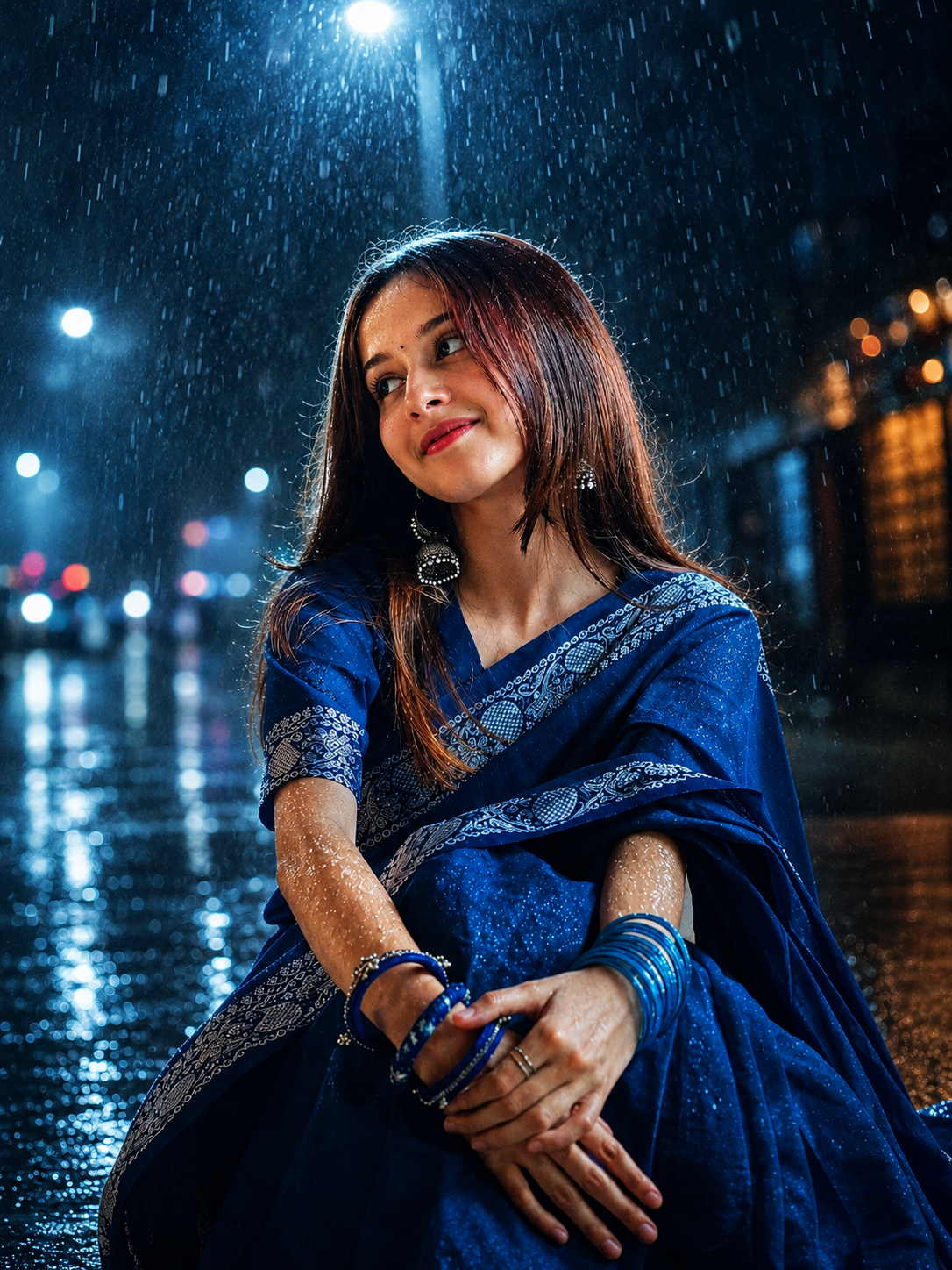
Ultra realistic cinematic rainy-night portrait of the SAME person from the uploaded reference image, 100% accurate face match, preserve exact facial features, hairstyle, skin tone, expression, outfit, accessories, body posture, and natural personality exactly as original photo. Transform the scene into a luxury cinematic rainy urban night environment while keeping the subject identical. Subject sitting naturally on a wet reflective street at night, dramatic overhead streetlight creating strong white rim light around hair and shoulders, realistic rain falling heavily, water droplets visible on skin and clothes, glossy wet road reflections, cinematic urban background with blurred street lights and warm orange-blue bokeh, deep blue-black nighttime atmosphere, subtle fog and atmospheric mist, realistic reflections on ground, premium editorial fashion photography vibe. Professional DSLR flash photography look, high contrast cinematic lighting, soft glow on face, realistic wet skin highlights, moody shadows, volumetric light rays from street lamp, realistic edge lighting, ultra natural exposure balance, luxury cinematic grading. Shot on 85mm lens, shallow depth of field, ultra sharp focus on eyes and face, realistic skin pores, hyper detailed fabric texture, smooth background blur, cinematic composition, realistic motion atmosphere, ultra detailed rain particles, professional color grading, Vogue-style editorial portrait, RAW 8k quality, ultra realistic shadows and highlights. Negative prompt: cartoon, anime, extra fingers, distorted face, unrealistic skin, blurry face, duplicate person, low quality, overexposed, artificial lighting, fake rain, bad anatomy, CGI look, oversaturated colors, unrealistic eyes, deformed hands.
Ultra realistic cinematic rainy-night portrait of the SAME person from the original image, 100% accurate face match, preserve exact hairstyle, beard, expression, outfit, and natural personality. Scene captured on a wet urban street at night with dramatic flash photography, reflective water surfaces, glowing street lights, realistic rain droplets, soft cinematic fog, white rim lighting around hair and shoulders, dark blue-black atmosphere, realistic wet skin highlights, ultra sharp eyes, detailed skin pores, natural shadows, DSLR portrait photography look, shallow depth of field, realistic motion atmosphere, luxury cinematic grading, emotional moody vibe, ultra premium editorial style, hyper detailed realism, atmospheric bokeh, realistic flash exposure, 8k RAW quality.
A cinematic AI portrait prompt is a detailed text instruction that guides an AI image generator to create photorealistic, movie-quality portrait images. It includes scene setup, lighting, camera details, mood, and negative prompts for best results.
Midjourney v6 and Leonardo AI give the most realistic cinematic portrait results. For face consistency, Leonardo AI’s Image-to-Image feature works best with a reference photo upload.
Yes! All three prompts are completely free to copy and use. Leonardo AI offers a free tier with daily generation credits. Midjourney requires a paid subscription but offers a free trial period.
Upload a clear, front-facing, well-lit reference photo. In Midjourney, use the –cref (character reference) flag. In Leonardo AI, use the Image-to-Image or IP-Adapter feature.
In AI image generation, “8K RAW” is a style keyword that signals the model to generate high-detail, texture-rich, photorealistic output. It significantly improves detail quality in most AI tools.