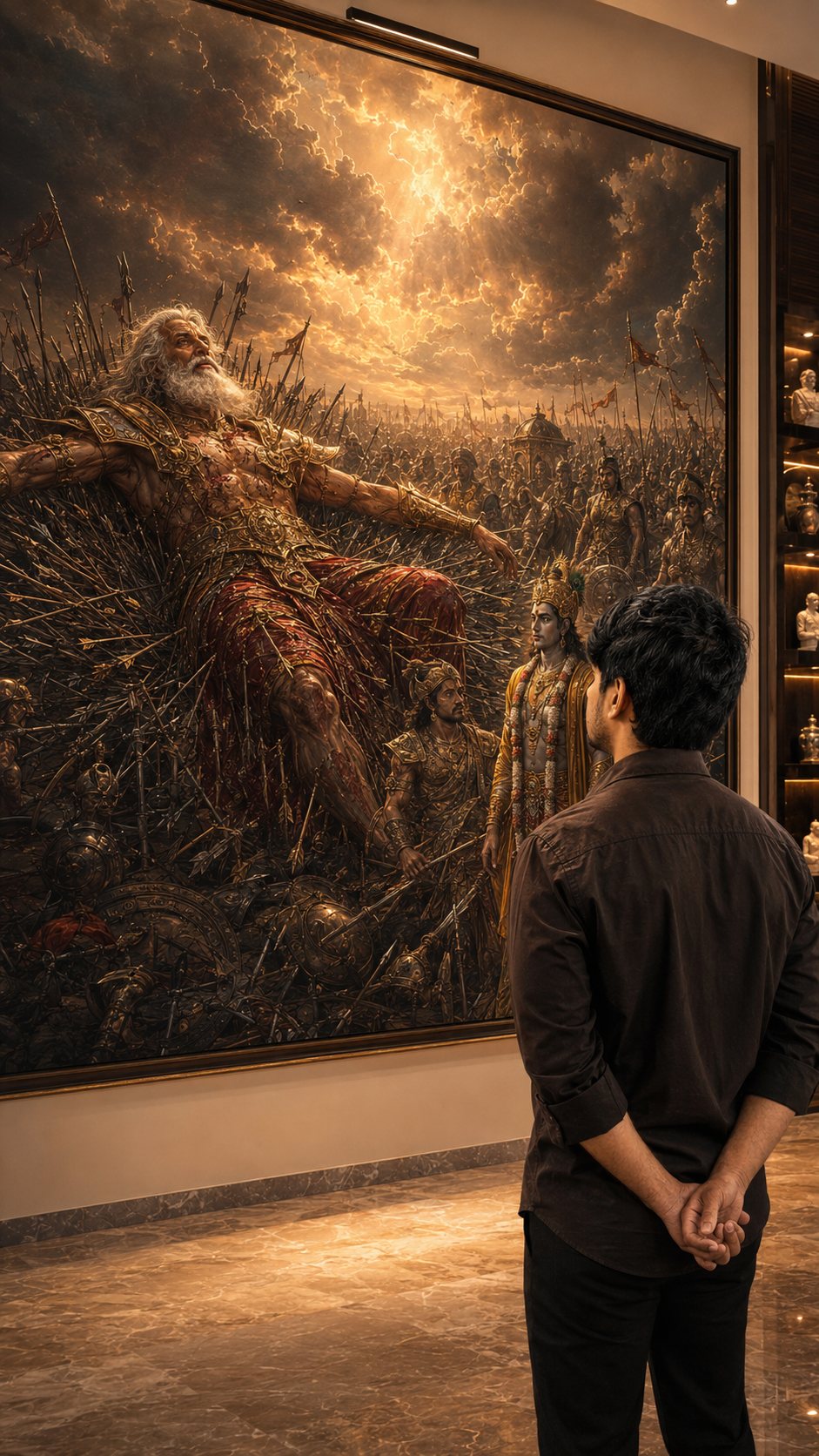
Person standing before Lord Krishna Mahabharata painting - AI cinematic photo

Mahabharata AI Photo Prompts — Lord Krishna & Bhishma 2025

AI Photo Editing
Mahabharata AI Photo Prompts — Lord Krishna & Bhishma 2025

Mahabharata AI photo prompts are trending everywhere right now — and honestly, I completely get why. I was just scrolling Instagram late at night when I saw this photo. A guy standing in a quiet room, back to the camera, hands folded. And behind him — this giant painting of Lord Krishna and Arjuna on the battlefield. White horses. Golden light. Dramatic clouds. I genuinely thought it was a scene from some big-budget film. Then the caption said “Made with AI prompt.” I sat up straight.

That moment got me. Like really got me.


What Are These Mahabharata AI Photo Prompts

See, basically what’s happening is people are using AI tools — ChatGPT with DALL-E, Midjourney, sometimes Gemini — to create cinematic photos where they appear standing inside a room with a large Mahabharata painting behind them. The most popular scenes right now are Lord Krishna driving the divine chariot with Arjuna, and Bhishma Pitamah lying on the Sharashayya — the bed of arrows on the Kurukshetra battlefield.

You upload your own photo. You paste a detailed prompt. The AI builds a version of you inside that scene — calm, back to camera, hands folded, looking at the painting. The final result looks like a luxury magazine shoot or something from a museum gallery.

And people are going crazy over this style. Probably because it connects two things that Indians feel very deeply — the timeless stories of Mahabharata and just wanting a powerful, meaningful photo for Instagram.


Create Mahabharata AI Photo Using These Prompts — Complete Guide

Alright, let me walk you through how this actually works. It is not complicated at all. You just need to understand what each part of the prompt is doing and why.

First thing — your reference photo matters a lot. Use a clear front-facing photo with decent lighting. No sunglasses. No group photos. Just your face visible clearly. The AI needs a clean reference to carry your face into the scene properly. This is the step most people skip and then wonder why the result looks off.

There are two prompts here. Prompt 1 is the Lord Krishna chariot scene — warm, cinematic, Bhagavad Gita energy. Prompt 2 is the full Bhishma Pitamah Sharashayya version — darker, more dramatic, battlefield scale. Both give amazing results but the mood is very different. Try both and see which one feels right to you.

For Prompt 1 — use this when you want something warm and instantly recognizable. The painting shows Lord Krishna driving the chariot with Arjuna. It reads quickly on Instagram and people understand the reference right away.

📜 Prompt 1 — Lord Krishna Chariot Scene
Transform the uploaded reference person into an ultra-realistic cinematic Bhagavad Gita inspired scene while preserving ONLY the exact facial identity, hairstyle, beard details, skin tone, and natural human realism from the uploaded reference image. IMPORTANT CAMERA ANGLE: the image should feel naturally clicked slightly from the left-back side perspective, not perfectly centered. The camera must capture both the person and the Mahabharata painting clearly in the frame exactly like a casual cinematic candid photo. The person should stand calmly facing the painting with both hands folded behind the back, giving a mature, leadership, wise, emotionally powerful, and self-controlled aura. The head should be slightly raised upward as if deeply thinking and absorbing the wisdom of Bhagavad Gita. Only a subtle portion of the side jawline and hairstyle should be visible naturally from the left-back angle – not a full side face. Outfit should be a realistic premium dark earthy-brown cotton shirt with soft rolled sleeves, natural wrinkles, realistic texture, and masculine minimal Indian aesthetic exactly like a stylish everyday luxury look. Environment should look like a realistic modern Indian luxury room or elegant home interior with soft cream/beige walls and warm cinematic indoor lighting. The Mahabharata painting should be colorful, rich, vibrant, and highly detailed Lord Krishna driving the divine chariot with Arjuna, white horses in motion, dramatic clouds, spiritual battlefield atmosphere, golden-orange tones, rich blue sky, premium mythological realism. The painting should remain fully visible while the person occupies the lower-right or center-right foreground naturally, creating balanced cinematic composition. Lighting style: realistic warm room lighting with subtle top glow above the artwork, natural indoor shadows soft highlights on hair and shoulders, realistic depth and cinematic warmth. The overall image must look like a real DSLR or iPhone portrait photograph captured naturally inside a luxury modern home absolutely NO anime look, NO AI-art appearance, NO illustration style. Ultra-photorealistic cinematic photography, authentic skin texture, realistic brown shirt fabric, natural hair details, cinematic color grading, subtle depth of field, premium Instagram aesthetic, emotionally powerful masculine leadership vibe. No text, no captions, no watermark, no UI elements. Vertical 9:16 composition

For Prompt 2 — this is the intense one. Bhishma Pitamah lying on the bed of arrows, with Lord Krishna and Arjuna standing near him. The entire Kurukshetra battlefield visible in the background painting. Use this when you want something that genuinely stops people mid-scroll. The prompt is long but do not cut it short — every line adds something to the final image.

⚔️ Prompt 2 — Bhishma Pitamah Sharashayya Scene
Transform the uploaded reference person into an ultra-realistic cinematic masterpiece photograph while preserving ONLY the exact facial identity, hairstyle, beard details, facial structure, skin tone, and natural human realism from the uploaded reference image. IMPORTANT CAMERA ANGLE: The camera captures the scene naturally from a slight left-back perspective, creating the feeling of an authentic candid luxury photograph rather than a posed portrait. The person stands in the lower-right foreground with both hands folded behind the back. Only a subtle portion of the jawline, beard profile, and hairstyle is visible. The head is slightly raised upward as if absorbing timeless wisdom and witnessing greatness. The person radiates calm dominance, self-control, leadership, discipline, fearlessness, and king-like masculine presence. He wears a premium dark earthy-brown cotton shirt with rolled sleeves, realistic fabric texture, natural wrinkles, and understated luxury styling. The setting is an elegant modern Indian luxury residence with warm cream-beige walls, premium marble flooring, sophisticated architectural lighting, and a subtle golden spotlight illuminating a colossal museum-scale Mahabharata artwork. The gigantic wall-sized painting dominates the entire room and depicts the legendary Bhishma Pitamah upon the Sharashayya in the most awe-inspiring and intimidating manner imaginable. Bhishma Pitamah lies elevated upon a mountain-like throne of thousands of arrows, yet appears completely unconquered. His powerful body remains upright and majestic despite countless arrows piercing his armor. His chest is broad, his posture noble, and his presence overwhelming. His eyes burn with unwavering determination, ancient wisdom, and fearless authority. His expression conveys the feeling of a warrior who cannot be broken by pain, death, destiny, or time itself. His long white hair and flowing beard move dramatically through violent battlefield winds. His battle-worn golden armor bears marks of countless wars, yet shines with divine radiance. Blood stains and battle scars are visible but portrayed with dignity and realism, emphasizing endurance rather than injury. Above him, the heavens erupt with colossal storm clouds, divine lightning, golden celestial light, and dramatic rays breaking through the sky. The atmosphere feels as if nature itself bows before the last great warrior. The endless Kurukshetra battlefield stretches into the horizon with thousands of warriors, elephants, cavalry, battle standards, shattered chariots, dust storms, and distant armies frozen in reverence. The scale should feel monumental and cinematic beyond imagination. At the foot of the Sharashayya stands Lord Krishna glowing with divine golden radiance, calm and eternal. Arjuna and the Pandavas stand respectfully nearby, appearing humbled before Bhishma’s immortal courage and sacrifice. The Sharashayya itself should resemble a throne of destiny rather than a place of suffering. The arrows form a majestic structure beneath Bhishma, symbolizing honor, sacrifice, invincibility, and eternal legacy. The painting must feel like a priceless royal masterpiece displayed in a king’s palace or world-class museum. Every detail should be breathtakingly realistic: metallic armor reflections, flying battlefield dust, dramatic clouds, divine sunlight, distant armies, realistic textures, and extraordinary depth. Lighting style: warm luxury interior lighting blended with divine golden rays emerging from the artwork. Soft cinematic highlights illuminate the observer’s shoulders and hair. Rich shadows, premium depth of field, and luxury editorial photography aesthetics. Mood: fearless, unconquered, immortal, legendary, intimidating, kingly, spiritually powerful, emotionally overwhelming. Ultra-photorealistic DSLR photography, authentic skin pores, natural hair strands, realistic cotton fabric textures, cinematic color grading, masterpiece realism, luxury Instagram editorial quality. Absolutely NO anime, NO illustration, NO fantasy-art look, NO AI-generated appearance, NO text, NO watermark, NO UI elements. Vertical 9:16 composition.

AI Photo Editing Tips For Best Result

Look, I ran this prompt many times before I got a result I was actually happy with. Here is what I learned from all those tries.

Photo quality matters more than anything else. A blurry selfie gives a blurry output. The AI cannot fix a bad source image. Take something in good daylight or clean indoor light. Face forward. Eyes clearly visible. That is all you need.

One thing that surprised me — I uploaded a photo with a plain white shirt once and the result looked far more realistic than when I wore a printed one. Simpler clothing seems to work better because the AI focuses more on the face and less on matching patterns.

And here is the mistake almost everyone makes. They paste the prompt, see the first result, and give up if it looks wrong. But you have to run it 3 or 4 times. Each generation comes out slightly different. Sometimes the face is perfect but the background painting looks flat. Sometimes the painting is stunning but the person looks a little off. Just regenerate. That is normal.

If the face keeps coming out distorted, go back and use a cleaner photo. The AI struggles when there are heavy shadows on the face or if the angle is too sideways. Give it a clear straight face and the results improve a lot.

Also worth knowing — ChatGPT with DALL-E gives better skin texture in my experience. Midjourney gives a more filmy, cinematic quality to the painting in the background. Try both tools if you have access.


How To Use These Trending Viral AI Photo Editing Prompts

This is the most practical part. Let me just walk through the exact steps so there is no confusion.

1

Open ChatGPT. You need the paid version — GPT-4o with image generation. The free version does not support this. If you do not have access, Adobe Firefly or Midjourney are good alternatives to try.

2

Click the image upload button inside the chat. Upload your photo — the clear front-facing one. This step is important. Your face needs to be in the prompt for the AI to place you inside the scene.

3

Use the red Copy Prompt button above to copy the full prompt text. Do not edit or shorten it. Paste it into the chat along with your uploaded image. Press send and wait around 15 to 30 seconds.

4

Look at what came out. Is your face clear? Is the Mahabharata painting visible and detailed behind you? If something feels wrong, just regenerate. No extra cost. Same prompt, new variation.

5

Once you get a result you like, download it. Open in Lightroom Mobile or Snapseed if you want. Add a small boost of warmth and contrast — not too much. The image already looks good. A tiny edit and it is ready to post.

Honestly the whole thing takes about 10 minutes once your photo is ready. The prompt does the hard work. You just need patience to try a few times and pick the best version.


You know what I keep thinking about when I look at these images. It is not really about AI or prompts or photo editing at all. It is that someone looked at Lord Krishna standing calm on that battlefield — guiding Arjuna through the hardest moment of his life — and thought, I want that energy behind me. And someone else looked at Bhishma Pitamah lying on a bed of arrows, still teaching the world, still unbroken — and thought the same thing.

That says something about us. About what we carry quietly inside. And honestly, if a simple prompt can help someone feel connected to that — I think that is worth something. Even if it is just a photo on Instagram.

🤖 AI Prompt — Copy Karo & Use Karo
Neeche prompt copy karo → ChatGPT ya Gemini mein photo ke saath paste karo!
✅ Prompt copy ho gaya!

Leave a Reply

Your email address will not be published. Required fields are marked *