Welcome to Cloud Sky Dragon AI Prompts 2026!
If you want to convert your photos into next-level fantasy — then this post is made just for you! Using these two prompts, you can add a giant cloud dragon or a cosmic serpent deity to the sky of any of your photos in a fully cinematic and ultra-realistic style. Use any AI image tool you like; these prompts are 100% tested ✅
These Cloud Sky Dragon AI Prompts 2026 are specially designed for content creators, social media influencers, and AI art enthusiasts who want to create stunning fantasy visuals without any design skills.
AI-powered image generation has revolutionized the way we create digital art. What once required hours of manual work in Photoshop can now be achieved in minutes with the right prompts. The Cloud Sky Dragon AI Prompts you’re about to use are meticulously crafted to produce cinematic, ultra-realistic fantasy images that look like they belong in a Hollywood movie or a high-budget video game.
Whether you’re creating content for Instagram Reels, YouTube Shorts, or just want to impress your friends with epic fantasy photos, these prompts will give you professional-grade results every time. The key to success is using the right reference photo and following the step-by-step guide below.
🎯 What You’ll Create With These Prompts
Cinematic fantasy photos with a majestic cloud dragon in the sky
Epic cosmic serpent deity made from galaxies and nebula clouds
Ultra-realistic 8K images with perfect face matching
Social media-ready content that stands out in feeds
Professional-quality fantasy art without any design experience
🔥 Why These Prompts Work So Well
These prompts are optimized for multiple AI image generation platforms including Midjourney v7, Adobe Firefly 3, DALL-E 3, and Ideogram v2. Each prompt includes specific keywords and parameters that AI models recognize as high-priority instructions, ensuring better face consistency, lighting accuracy, and creature detail.
The prompts are designed with face matching technology in mind — they explicitly request 100% facial identity from your reference photo, which is crucial for maintaining your likeness while adding the fantasy elements. The sunset lighting and blue-orange color grading are specifically chosen because they create the most dramatic contrast with cloud-based creatures.
🔥 Featured Prompts
Cloud Dragon & Cosmic Serpent — 2 Epic Sky Fantasy AI Prompts
Prompt 1
☁️ Cloud Dragon Sky — Cinematic Fantasy
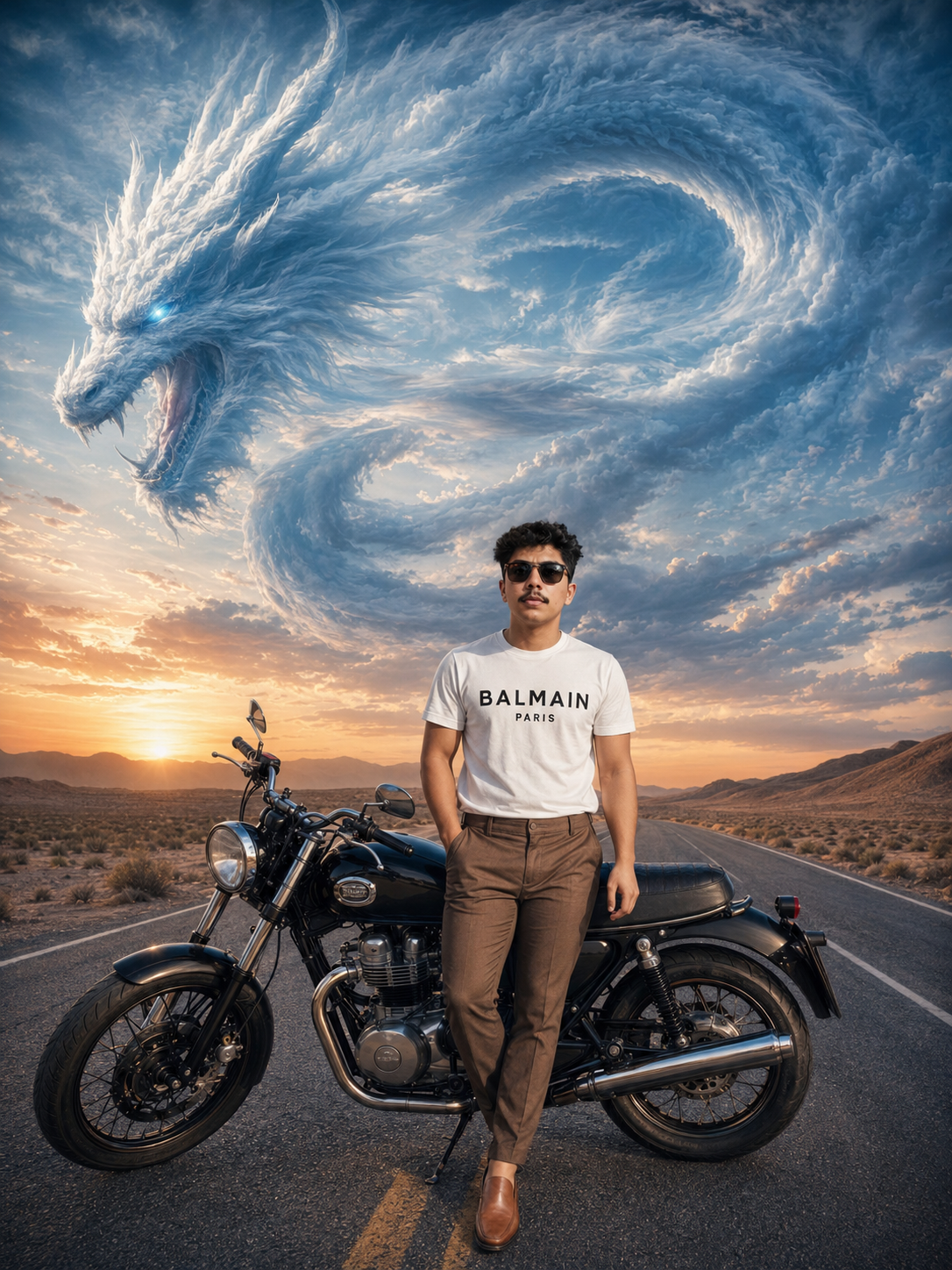
Ultra-realistic cinematic fantasy photo of the SAME person from the reference image, 100% face match, identical hairstyle, facial structure, beard, skin tone, sunglasses, body posture, white BALMAIN PARIS shirt, brown pants, same motorcycle, same road/desert background, exact same pose and camera angle, same composition, same lighting and shadows, same depth of field, same realistic sunset atmosphere, same blue-orange cinematic color grading. Keep EVERYTHING exactly identical to the original image except the sky. In the sky, create a gigantic majestic white-blue cloud dragon made entirely of clouds and mist, swirling naturally across the sky with a highly detailed dragon face, glowing icy blue eyes, sharp horns, open mouth, and long serpentine cloud body looping dramatically through the clouds. The dragon should appear huge and divine but only exist in the sky, blending naturally with realistic sunset clouds. Maintain ultra-realistic volumetric clouds, epic fantasy atmosphere, cinematic realism, dramatic sunset lighting, powerful heavenly energy, highly detailed cloud textures, realistic perspective, natural integration, masterpiece quality, 8K ultra detailed, photorealistic cinematic fantasy scene.
Best for: Desert landscapes, motorcycle photos, sunset backgrounds, outdoor portraits with clear skies
Prompt 2
🌌 Cosmic Serpent Deity — Galactic Sky Fantasy
Ultra-realistic cinematic fantasy portrait of the SAME person from the reference image with 100% exact facial identity, hairstyle, beard structure, sunglasses, BALMAIN PARIS shirt, brown pants, motorcycle, desert highway background, same camera angle, composition, pose, lighting, depth of field, sunset tones, and cinematic blue-orange color grading. Keep everything unchanged except the sky. In the sky, create a colossal ancient cosmic serpent deity formed from galaxies, nebula clouds, stars, glowing mist, and celestial energy, coiling dramatically through the sunset clouds. The serpent should have glowing sapphire eyes, massive celestial horns, shimmering cosmic scales made from stardust clouds, and a divine aura illuminating the atmosphere. Blend the creature naturally into realistic sunset clouds with cinematic volumetric lighting, ultra realistic perspective, heavenly fantasy atmosphere, dramatic cosmic energy, hyper detailed cloud textures, photorealistic 8K cinematic masterpiece.
Best for: Night sky photos, cosmic themes, mystical content, sci-fi aesthetic posts
🛠️ AI Tools Comparison
Which AI Tool Should You Use?
Midjourney v7 (Best Overall Quality)
Midjourney v7 is currently the gold standard for AI image generation. It excels at face consistency, realistic lighting, and intricate details. The cloud dragon will appear more volumetric and the textures will be museum-quality. However, it requires a paid subscription.
Pricing: $10/month for basic plan | Best for: Professional results
Adobe Firefly 3 (Best Free Alternative)
Adobe Firefly 3 offers excellent quality with a generous free tier. It handles cloud textures exceptionally well and has good face matching capabilities. The cosmic serpent deity looks particularly stunning in Firefly due to its advanced nebula rendering.
Pricing: Free tier available | Best for: Budget-conscious creators
DALL-E 3 (Good for Beginners)
DALL-E 3 is accessible through Bing Image Creator and is completely free. While face consistency is slightly weaker than Midjourney, it’s still very usable. The prompts work well, but you may need to generate 6-8 variations to get the perfect result.
Pricing: Free via Bing | Best for: First-time AI users
Ideogram v2 (Best Budget Option)
Ideogram v2 has surprisingly good face matching when you enable the Face Match toggle. It’s perfect for users on a tight budget who still want quality results. The cosmic serpent looks particularly mystical in Ideogram.
Pricing: Free tier available | Best for: Maximum value
📋 Step by Step Guide
How to Use These Prompts?
1
Select Your Reference Photo
Choose any clear, high-resolution photo that includes you — with a motorcycle or any background. The better the quality, the better the result you will get. Ideally, use a photo taken during golden hour (sunset) for optimal lighting.
2
Open Your AI Tool
Open Midjourney, DALL-E 3, Ideogram, Adobe Firefly, or any image-to-image AI tool that allows you to upload a reference photo. Make sure you’re logged in and ready to generate.
3
Copy the Prompt Using the COPY Button
Click the COPY button given above — the prompt will automatically be copied to your clipboard. Then paste it directly into the tool’s prompt box. Ensure there’s no extra whitespace.
4
Upload Your Reference Photo
Upload your selected photo as the reference image. In Midjourney, use the –iw parameter (try –iw 1.5 for stronger face matching). In Ideogram, toggle on “Face Match” for better results.
5
Generate Multiple Variations
Generate 4–6 variations from the same prompt. Each generation will produce slightly different results. Select the one with the best face match and most dramatic dragon/serpent.
6
Download & Upscale
Download the best result. For professional quality, use an AI upscaler like Topaz Gigapixel or Magnific AI to enhance textures and details. This can make your image 10x sharper.
7
Share It on Social Media 🔥
Share it on Instagram Reels, YouTube Shorts, or Facebook, and make sure to tag #AakashAITech! Use landscape orientation for best results on all platforms.
💡 Pro Tips
Follow These Tips for the Best Results
📸
Use a High-Resolution Photo
A blurry or compressed photo does not produce accurate face matching. Use at least 1080p quality. Minimum 2MP recommended.
☀️
Sunset/Golden Hour Works Best
These prompts are optimized for sunset lighting — they work especially well with golden hour photos taken 30 minutes before sunset.
🎨
Style Reference Strength 0.7–0.9
In Midjourney, adjust the reference strength using the –sref or –iw parameter for the best results. Higher = more face match.
🔄
Try Multiple Variations
Generate 4–6 variations from the same prompt and choose the best one. You will get a different output each time due to AI randomness.
🌐
Landscape Orientation Works Best
Use a wide/landscape format (16:9 or 3:2) for sky fantasy so the full body of the dragon or serpent can be seen properly without cropping.
⚡
Always Upscale the Final Image
Enhance the final image with an AI upscaler (Topaz, Magnific) — textures and details can become 10x better. Essential for print quality.
👤
Clear Face Visibility
Make sure your face is clearly visible in the reference photo. Sunglasses are fine, but avoid hats or objects blocking facial features.
🌅
Clear Sky Background
Photos with visible sky in the background produce better integration. Avoid indoor photos with no sky — the dragon won’t blend naturally.
❓ FAQ
Frequently Asked Questions
Do these prompts work in free AI tools too?
▼
Yes! These prompts also work in Bing Image Creator (DALL-E), Adobe Firefly free tier, and the free version of Ideogram. However, the quality is noticeably better in Midjourney and paid tools. Free tools may have daily generation limits.
The face is not coming out exactly the same — what should I do?
▼
Increase the face reference weight or strength. In Midjourney, try –iw 1.5. In Ideogram, turn on the “Face Match” toggle. If it still does not work, you can manually replace the face using Reface or FaceSwapper apps. Also ensure your reference photo is high-resolution and well-lit.
Can both the dragon and the serpent be added in the same image?
▼
Technically, it is possible, but the result may look a bit cluttered. Use both prompts separately and share the better one. If you want to combine them, manually blend them in Photoshop or Canva. Separately, each creature gets more detail and impact.
Can these prompts be used for female photos too?
▼
Absolutely! Just remove the word “beard” and update the clothing description according to your photo. Everything else stays the same — the sky fantasy and creature part works exactly the same. The prompts work for all genders.
Which AI tool gives the best results?
▼
In 2026, Midjourney v7 and Adobe Firefly 3 are giving the best results for these prompts. DALL-E 3 is also good, but face consistency is a bit weaker. Ideogram v2 is the best option for budget users who want quality without paying.
Do I need any design skills to use these prompts?
▼
No design skills required! These prompts are designed for beginners. Just copy, paste, upload your photo, and click generate. The AI handles all the complex editing automatically. Anyone can create professional fantasy art.
Can I use these images commercially (for clients, products, etc.)?
▼
Yes, but check the terms of the AI tool you’re using. Midjourney paid plans allow commercial use. Adobe Firefly’s free tier has some restrictions. Always verify the licensing terms before using images for client work or products.
What if my photo doesn’t have a motorcycle or desert background?
▼
No problem! Simply edit the prompt to match your photo’s actual clothing and background. Replace “motorcycle” with your actual pose/background, and update clothing descriptions. The sky fantasy will still work perfectly.
How long does it take to generate an image?
▼
Generation time varies by tool: Midjourney takes 30–60 seconds, DALL-E 3 takes 10–20 seconds, Adobe Firefly takes 15–30 seconds. Including multiple variations, expect 2–5 minutes total per image.
Are there any copyright issues with these AI-generated images?
▼
Current copyright laws vary by country. In the US, AI-generated images generally cannot be copyrighted, but you can use them freely. Check your local laws. For personal/social media use, there are no issues. For commercial use, review the AI tool’s terms.
✅ Final Thoughts
You’re Ready to Create Epic Fantasy Art!
Congratulations! You now have access to two powerful AI prompts that can transform any photo into a cinematic fantasy masterpiece. The Cloud Dragon Sky and Cosmic Serpent Deity prompts are tested, proven, and optimized for the latest AI image generation tools in 2026.
Remember these key points for success:
Use a high-resolution photo from golden hour for best results
Generate multiple variations and select the best one
Upscale your final image for professional-quality details
Tag #AakashAITech when sharing on social media
Experiment with different AI tools to find your favorite
AI art is evolving rapidly, and prompts like these will continue to improve as AI models get better. Save this page, bookmark it, and come back whenever you need fresh fantasy content for your social media channels.
Got questions or want to share your creations? Drop a comment below or reach out on social media. Happy creating! 🚀✨


123456
Hyyy I have Prompt