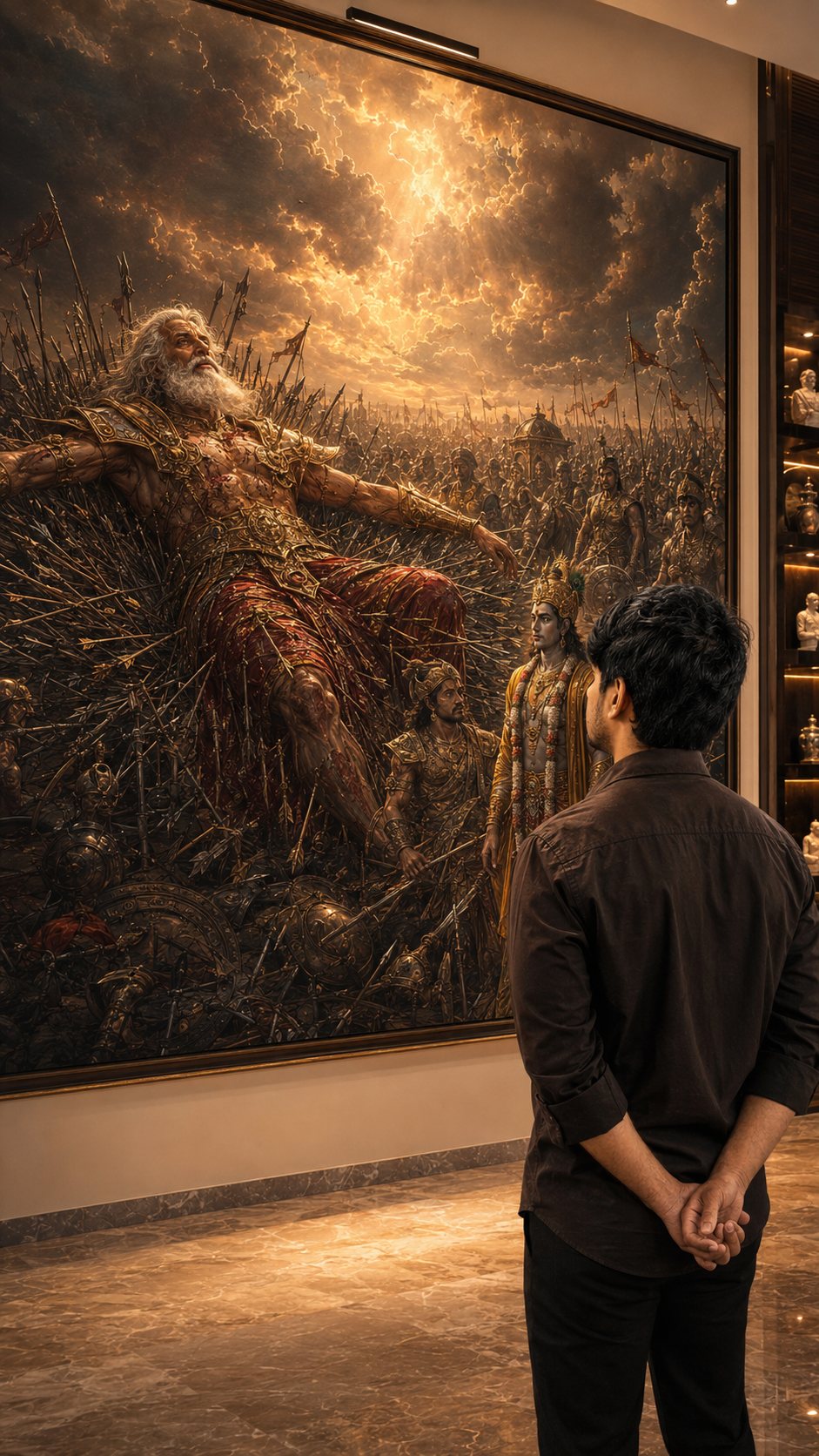
Mahabharata AI photo prompts are trending everywhere right now — and honestly, I completely get why. I was just scrolling Instagram late at night when I saw this photo. A guy standing in a quiet room, back to the camera, hands folded. And behind him — this giant painting of Lord Krishna and Arjuna on the battlefield. White horses. Golden light. Dramatic clouds. I genuinely thought it was a scene from some big-budget film. Then the caption said “Made with AI prompt.” I sat up straight.
That moment got me. Like really got me.
What Are These Mahabharata AI Photo Prompts
See, basically what’s happening is people are using AI tools — ChatGPT with DALL-E, Midjourney, sometimes Gemini — to create cinematic photos where they appear standing inside a room with a large Mahabharata painting behind them. The most popular scenes right now are Lord Krishna driving the divine chariot with Arjuna, and Bhishma Pitamah lying on the Sharashayya — the bed of arrows on the Kurukshetra battlefield.
You upload your own photo. You paste a detailed prompt. The AI builds a version of you inside that scene — calm, back to camera, hands folded, looking at the painting. The final result looks like a luxury magazine shoot or something from a museum gallery.
And people are going crazy over this style. Probably because it connects two things that Indians feel very deeply — the timeless stories of Mahabharata and just wanting a powerful, meaningful photo for Instagram.
Create Mahabharata AI Photo Using These Prompts — Complete Guide
Alright, let me walk you through how this actually works. It is not complicated at all. You just need to understand what each part of the prompt is doing and why.
First thing — your reference photo matters a lot. Use a clear front-facing photo with decent lighting. No sunglasses. No group photos. Just your face visible clearly. The AI needs a clean reference to carry your face into the scene properly. This is the step most people skip and then wonder why the result looks off.
There are two prompts here. Prompt 1 is the Lord Krishna chariot scene — warm, cinematic, Bhagavad Gita energy. Prompt 2 is the full Bhishma Pitamah Sharashayya version — darker, more dramatic, battlefield scale. Both give amazing results but the mood is very different. Try both and see which one feels right to you.
For Prompt 1 — use this when you want something warm and instantly recognizable. The painting shows Lord Krishna driving the chariot with Arjuna. It reads quickly on Instagram and people understand the reference right away.
For Prompt 2 — this is the intense one. Bhishma Pitamah lying on the bed of arrows, with Lord Krishna and Arjuna standing near him. The entire Kurukshetra battlefield visible in the background painting. Use this when you want something that genuinely stops people mid-scroll. The prompt is long but do not cut it short — every line adds something to the final image.
AI Photo Editing Tips For Best Result
Look, I ran this prompt many times before I got a result I was actually happy with. Here is what I learned from all those tries.
Photo quality matters more than anything else. A blurry selfie gives a blurry output. The AI cannot fix a bad source image. Take something in good daylight or clean indoor light. Face forward. Eyes clearly visible. That is all you need.
And here is the mistake almost everyone makes. They paste the prompt, see the first result, and give up if it looks wrong. But you have to run it 3 or 4 times. Each generation comes out slightly different. Sometimes the face is perfect but the background painting looks flat. Sometimes the painting is stunning but the person looks a little off. Just regenerate. That is normal.
If the face keeps coming out distorted, go back and use a cleaner photo. The AI struggles when there are heavy shadows on the face or if the angle is too sideways. Give it a clear straight face and the results improve a lot.
Also worth knowing — ChatGPT with DALL-E gives better skin texture in my experience. Midjourney gives a more filmy, cinematic quality to the painting in the background. Try both tools if you have access.
How To Use These Trending Viral AI Photo Editing Prompts
This is the most practical part. Let me just walk through the exact steps so there is no confusion.
Open ChatGPT. You need the paid version — GPT-4o with image generation. The free version does not support this. If you do not have access, Adobe Firefly or Midjourney are good alternatives to try.
Click the image upload button inside the chat. Upload your photo — the clear front-facing one. This step is important. Your face needs to be in the prompt for the AI to place you inside the scene.
Use the red Copy Prompt button above to copy the full prompt text. Do not edit or shorten it. Paste it into the chat along with your uploaded image. Press send and wait around 15 to 30 seconds.
Look at what came out. Is your face clear? Is the Mahabharata painting visible and detailed behind you? If something feels wrong, just regenerate. No extra cost. Same prompt, new variation.
Once you get a result you like, download it. Open in Lightroom Mobile or Snapseed if you want. Add a small boost of warmth and contrast — not too much. The image already looks good. A tiny edit and it is ready to post.
Honestly the whole thing takes about 10 minutes once your photo is ready. The prompt does the hard work. You just need patience to try a few times and pick the best version.
You know what I keep thinking about when I look at these images. It is not really about AI or prompts or photo editing at all. It is that someone looked at Lord Krishna standing calm on that battlefield — guiding Arjuna through the hardest moment of his life — and thought, I want that energy behind me. And someone else looked at Bhishma Pitamah lying on a bed of arrows, still teaching the world, still unbroken — and thought the same thing.
That says something about us. About what we carry quietly inside. And honestly, if a simple prompt can help someone feel connected to that — I think that is worth something. Even if it is just a photo on Instagram.