I Thought It Was Just Another Filter — Then I Actually Tried These AI Desi Portrait Collage Prompts
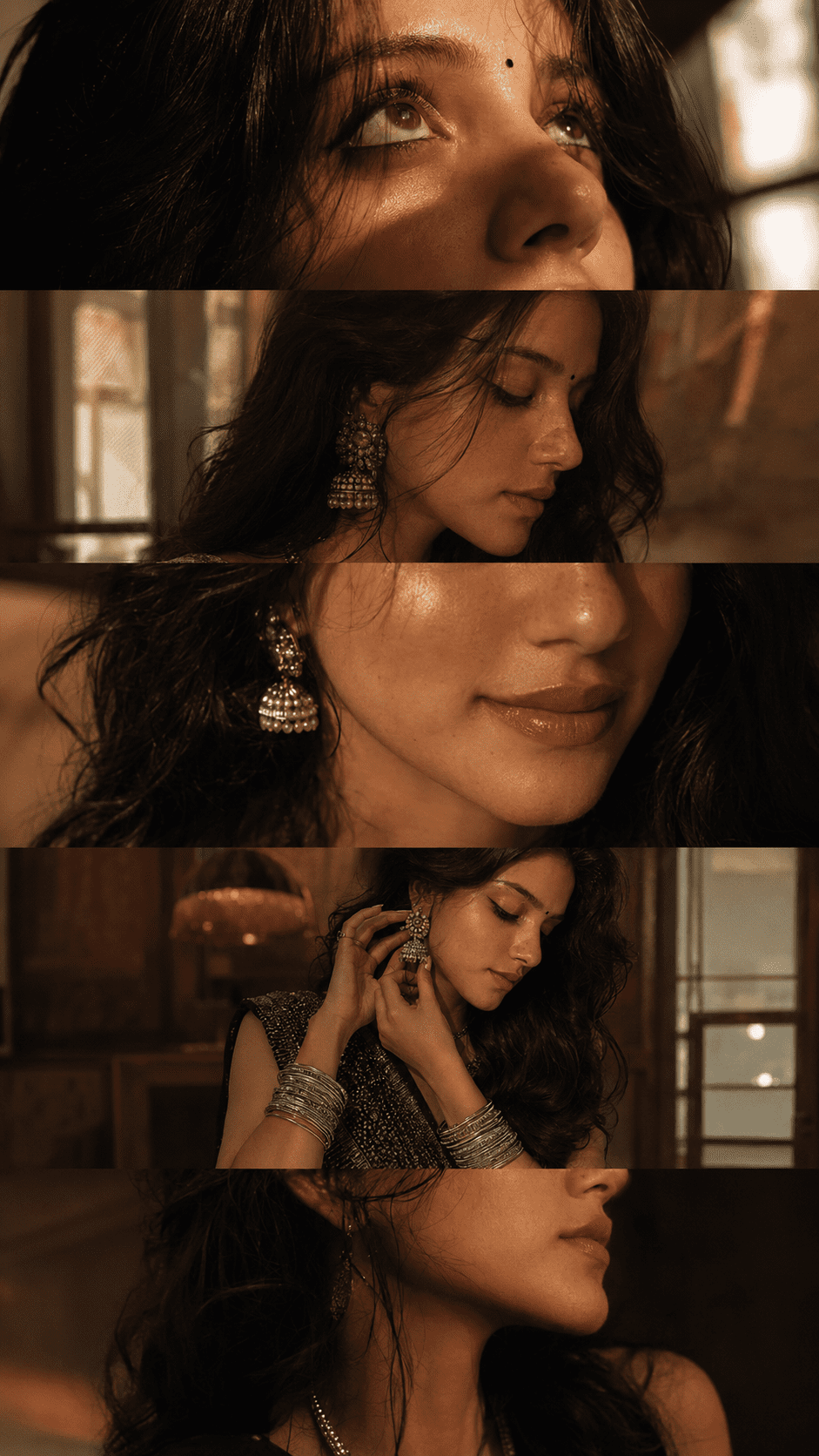
Honestly, I was just scrolling reels one night and stopped at this one image. Five frames. One vertical picture. Looked like a proper Bollywood editorial shoot. And I just kept staring at it thinking — yaar, this must have taken hours to make.
It took someone literally two minutes. One AI desi portrait collage prompt. That’s all.
So What Even Is This AI Desi Portrait Collage Trend?
Okay so basically, this is an AI image generation trend where you write a detailed text prompt and AI creates a full cinematic collage for you. One vertical 9:16 image with 5 different close-up frames stacked together — eyes, lips, side profile, waist-up, neckline — all in one shot. Looks like something from a luxury fashion magazine.
And the best part? These AI desi portrait collage prompts are made for desi aesthetic. Bindi, bangles, silky black hair, ethnic outfit, golden skin — AI actually understands all of this if you use the right words.
See, it’s not magic. It’s just knowing what to write. The more specific you are, the better the output.
Create AI Desi Portrait Collage Using Prompts — Complete Guide
Alright, let’s get into it. First, pick your tool. ChatGPT with image generation works great. Adobe Firefly is free and gives really realistic skin texture. Midjourney is probably the best quality but needs a paid plan. Start with ChatGPT or Firefly if you’re trying this for the first time.
Now the actual step that matters — the AI desi portrait collage prompt. This is where most people go wrong. They write something like “desi girl portrait” and then wonder why the result looks generic. You have to describe everything. Every single frame. The lighting. The vibe. The jewelry. The skin. Think of yourself as the director and AI as your photographer.
Which Prompt Should You Use?
There are two prompts below. One is for a neon futuristic night aesthetic — very Instagram reel cover energy. The other one is for a warm golden hour indoor look — more Pinterest, more cozy editorial. Use whichever matches the vibe you want.
Copy Your AI Desi Portrait Collage Prompt Below
Why are these AI desi portrait collage prompts so long? Because AI needs context for every frame separately. If you just say “5 frames,” AI will decide what goes in each frame on its own. And honestly, it never decides the way you want. So you tell it exactly — frame 1 is eyes, frame 2 is side profile, and so on. That’s the whole trick.
AI Photo Editing Tips For Best Result
Always Mention the Aspect Ratio
Look, I made mistakes before I figured this out. First thing — always write 9:16 clearly in your AI desi portrait collage prompt. If you skip this, AI will generate a square or landscape image and the whole collage layout breaks. I skipped it once and got a completely different composition. Wasted the whole attempt.
Use Quality Keywords in Your Prompt
Words like “ultra-realistic,” “4K,” and “DSLR texture” actually matter. I thought they were just filler words. But when I removed them, the skin started looking a little plastic and fake. When I put them back, the texture improved noticeably. Something about these words signals the AI to focus on fine details.
But the thing that surprised me the most was how much lighting description changes the final image. I used to just write “good lighting” and the result was always flat. The moment I wrote something specific like “amber golden-hour window light mixed with soft cool indoor tones” — the whole mood shifted completely.
Run the Prompt Multiple Times
And one more thing — don’t stop at one result. Run the same AI portrait collage prompt three or four times. Every generation is different. In one image the eyes will be perfect, in another the hair will look better. Pick the best one from multiple runs. Most people try once, feel disappointed, and give up. That’s the wrong way to use this.
How To Use These Trending Viral AI Photo Editing Prompts
Okay this part is actually very simple. Let me just walk you through it like I’m sitting next to you.
Step 1 — Open Your AI Tool
Open ChatGPT. If you have ChatGPT Plus, image generation is built right in. Free users sometimes get access to DALL-E too, but it’s not always available. If you don’t have ChatGPT Plus, go to Adobe Firefly — it’s free, works in your browser, no download needed, and the skin texture quality is genuinely good.
Step 2 — Paste the Full Prompt
Now copy one of the two AI desi portrait collage prompts above — copy the full text, don’t shorten it. Open a new chat in ChatGPT, paste the prompt directly, and hit enter. Don’t upload any image. Don’t add anything extra. Just paste and go.
Step 3 — Set Aspect Ratio in Firefly
In Adobe Firefly, go to the “Text to Image” section. Paste the prompt in the text box. Before generating, manually set the aspect ratio to 9:16 from the settings panel on the right side. This step matters because Firefly doesn’t always auto-read aspect ratio from prompt text the way ChatGPT does.
Step 4 — Check and Refine
Once the image generates, zoom in and check three things first — the eyes, the skin texture, and the hair. If something looks off, add this line to your prompt: “natural pore texture, subtle skin imperfections, soft eye detail.” Regenerate and compare. Download the final image and use it directly as an Instagram reel cover or Pinterest post.
Yeh Sab Dekh Ke Thoda Ajeeb Bhi Lagta Hai, Honestly
I think about this sometimes. Like, someone spent years learning photography, lighting, editing — and here we are generating something that looks similar in two minutes using AI desi portrait collage prompts. I don’t know how I feel about that completely. It’s impressive and a little strange at the same time.
But I’ll say this — if you just want something beautiful to post, something that looks like it took real effort, this actually works. No photoshoot budget needed. No fancy camera. Just words. And somehow that’s enough now.